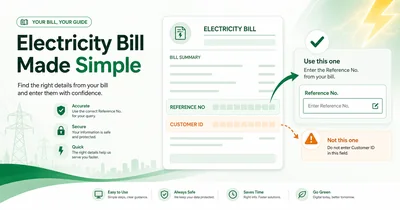
A Pakistani electricity bill can show several account values close together. Reference No, Customer ID, meter number and bill number may sit in one customer block. The labels look similar. Their uses are not the same.
The phrase "reference number or customer ID electricity bill" normally means one practical question. What printed value belongs in the open field? The safest answer is simple. Match the printed label with the field label. Digit count comes second.
Use it for bill lookup, payment and complaint decisions. It also covers LESCO's Customer-ID exception and K-Electric's separate route. Open the newest bill before making any lookup, payment or complaint choice.
Use it before opening a bank app or ATM. The same habit also helps at a counter. It takes seconds. It can prevent a failed lookup or a wrong account preview.
Do not treat this page as a copy of the label-location guide. The earlier guide shows where the reference row sits. This guide selects the field. Then check your bill with the right number.
Official-source review: We checked Power Division, K-Electric and Allied Bank pages on 6 October 2026. Indexed official LESCO and GEPCO guidance also informed the field exceptions.
Reference number or customer ID electricity bill?
Quick answer: Use Reference No only in a field named Reference No. Use Customer ID only in a field named Customer ID. Do not decide by digit count. Formats vary by company and channel.
K-Electric users follow a different route. They use the account-number flow, not the normal PITC reference field.
A person searching reference number or customer ID electricity bill usually needs a field decision. The definition matters less than the match. A correct number in the wrong box can still fail. Stop and read both labels first.
The same rule holds during a rushed payment. It also holds inside an official complaint form. Match first. Copy next.
Match the field before you copy
Use this three-step check each time.
- Find the printed label on the newest bill.
- Open the checker, official portal or trusted payment channel.
- Compare the printed label with the live field label.
A printed REFERENCE NO belongs in a Reference No box. A printed CUSTOMER ID belongs in a Customer ID box. Stop after the first pass.
Take a clear photo of the customer block for close reading. Zoom in without cropping the label. Context matters. A clean photo also helps after a smudge.
Some PITC-style fields accept digits only. A nearby U or R may stay out of the selected field. Follow the visible instruction for the selected route. Read the exact row. Avoid the bolder meter row nearby.
Do not add extra zeroes. Do not remove printed zeroes. Never pad a short Customer ID to force a 14-digit field.
One wrong character can create a dead end. One wrong row can also open another account record. The field match prevents both mistakes.
What do the two identifiers mean?
A reference number is the main lookup value for many PITC-style duplicate-bill routes. It may appear in grouped digits. It often sits near customer details.
Customer ID is a separate customer identifier. An official portal or payment channel may offer a matching Customer ID option. Other routes may not offer one.
Both identifiers can point toward the same underlying account record in the company database. This shared destination does not make them interchangeable. The selected field still controls the allowed value.
These values exist for different operational uses. A bill statement may show all of them together. The public user still needs only one value at a time. Use the value named by the selected screen. Leave every other identifier alone.
| Printed label | What users should do | Common error |
|---|---|---|
| Ref No / Reference No | Use only in the matching official reference field | Pasting Customer ID |
| Customer ID / Consumer ID | Use only in its matching field | Treating it as a shorter reference number |
| Account Number on KE bill | Use the official KE account-number route | Treating KE like a normal PITC bill |
| Meter No | Do not use as the ordinary public lookup value | Copying the physical meter identifier |
Match the printed label with the field label before you proceed. This rule works even after a bill layout changes. It also works across companies with different formats.
Skip secret digit meanings. Some public guides guess at supply codes or company codes. Those patterns do not help the field decision. The printed field name is enough.
Bill layouts also vary by revision. One company may place Customer ID under Reference No. Another may place it beside the main customer name. Neither position changes the matching rule.
Which number should you use?
The task changes the answer. A lookup page, wallet app, ATM and complaint form can all use different labels. Check the open screen before you copy a value.
| Task or screen | Use this rule |
|---|---|
| PITC field asks for Reference No | Use printed REFERENCE NO from the newest bill |
| PITC field offers Customer ID | Use it only after selecting the listed option |
| Bank app asks for reference number | Use the reference number and verify account details |
| Wallet app asks for customer ID or consumer number | Follow the wallet's exact label and verify details |
| ATM or counter | Take the printed bill for staff or screen comparison |
| Official complaint | Quote the reference number or provide the bill photo through the official channel |
| Recovery without a bill | Use payment history, old receipts or account-holder help |
Do not assume both numbers work. The selected channel defines the accepted input. The bill label defines the value you can safely copy.
Use the table before any entry. It is not a universal rule for all future screens. The same bank may rename a field later. Bill layouts also change. Fresh labels remain the only stable guide.
A slower first check is useful here. This habit protects a payment, a lookup and a later complaint. Check again.
A payment preview needs one final check. Compare the account name, company and amount before you confirm. Stop after a blank preview or a mismatched name.
Consider a LESCO paper bill and a wallet screen labeled Consumer Number. Pause. The wallet may mean a different field. Look for a customer preview before continuing.
Channel labels can change between one bank's web version and app version. ATM screens may use another label again. Read the current screen every time.
Watch an ATM example. A screen can ask for a reference ID. Start from the printed reference row. Always verify the returned account detail before any payment.
Often, the answer to reference number or customer ID electricity bill is written on the live screen. The live screen names the accepted field.
Which number works for bill lookup?
A PITC-style field named Reference No expects the printed reference number. Copy the digits from the newest bill. Keep Customer ID separate.
A shorter Customer ID does not belong in a 14-digit reference field. Padding it can produce an invalid value. Removing zeroes can also break the printed sequence.
Some official forms may offer Customer ID as a separate option. Use this option only after selecting it. Do not move the same value into the reference box.
Company selection matters too. A correct LESCO number will not open inside a MEPCO route. Confirm the company before blaming the number.
Check the company code or logo on the bill as well. LESCO, FESCO and IESCO each maintain a distinct official route for their customers. A copied portal link can mask a wrong selection.
Use the newest duplicate after a correction. An old bill can carry an older reference. The newer record gives the selected field its best chance of matching the active company record.
The site's current DISCO checker routes use a reference-number field where the form asks for one. You can open the bill checker after the printed match is clear.
Type slowly on a phone. A small screen can hide one digit. Read the pasted value once from left to right. Compare the last four digits. This catches paste errors.
Still stuck at the label stage? Find the exact reference label on the newest bill first.
A clean entry can still fail after a record change. Move to the recovery path next. Start here after the number is not found online.
Which number works for bill payment?
Payment channels use several labels. You may see Reference Number, Reference ID, Customer ID, Consumer Number or Bill Number. The words look close. The validation can differ.
Allied Bank's official IESCO guide shows this variation. One route may ask for a reference number. Another page for a related service may use reference ID language.
Follow the live channel label. Do not import a label from a different app. A bank's website, mobile app and ATM can ask for different wording.
Names can differ even inside one bank family. One menu says biller number. Another menu says consumer number. Read the current page rather than relying on habit.
Enter the printed value from the matching bill field only. Then wait for the account preview. Compare company, customer name and amount before confirmation.
Keep the printed bill visible beside the phone. Do not copy one number from the meter row beside the active customer field. Move a finger under the active label. Then copy the paired value. This simple physical guide works well on a crowded bill.
No preview gives no protection. Pause and use a printed bill at a bank counter instead. You can also switch to the official bill route.
Payment agents may also read the bill aloud. Ask them to match the field label on their screen. This short request protects the transaction.
Do not test random values. A wrong account can accept a payment before anyone notices the mistake. Recovery takes extra steps after confirmation.
For the full safe sequence, pay your electricity bill online safely after the field match and account preview pass.
Which number should you quote in a complaint?
Use Reference No in a complaint field named Reference No. Use Customer ID in a field named Customer ID. The same label rule still applies.
The Power Division complaint note mentions a reference number or bill photo. Give the item the official channel requests. Do not attach a public post link.
Keep these items ready for a billing complaint:
- the newest bill;
- a screenshot of the failed lookup;
- the payment transaction ID;
- a meter-reading photo for reading disputes;
- the official complaint reference.
A photo of the full bill can expose personal and account details. Share it only through the concerned official route. Never upload it to a public group.
Write the official complaint reference in a safe place. A photo or SMS copy can help later. Keep it available for follow-up contact.
For account or billing corrections, official support may need the bill month and amount. Keep the payment receipt as well. A complete record reduces repeated visits.
For a paid-bill dispute, give the payment date, amount and selected channel. Add the receipt number from the bank or wallet. Keep the downloaded receipt apart. These records show the exact transaction trail.
Describe the issue briefly. Mention a wrong amount, missing bill or failed posting. Avoid guesses about the internal cause.
Unresolved complaints need the company's official service route. Use the sub-division or customer-service path listed on genuine company material. Do not trust an unofficial inbox.
Why LESCO proves digit guessing is risky
Many third-party pages say Customer ID always has ten digits. Indexed official LESCO guidance breaks this rule. Its SMS registration page references a 7-digit Customer ID.
This evidence rejects the universal ten-digit claim. It does not prove every LESCO record uses seven digits. Other records or channels may use a different printed value.
The official-indexed wording deserves care. It is narrower than third-party summaries. Old screenshots and copied tables can hide this difference.
Digit counting still helps with checking. Length alone cannot identify it. A short printed Customer ID remains a Customer ID. A long printed Reference No remains a Reference No.
LESCO users should read the row label first. Use the printed reference number in a reference field. Use the printed Customer ID only inside a matching Customer-ID option.
Check the current instruction on the local LESCO page before entering either value. The site may show both fields separately. Select only the option matching your printed row.
The same caution applies to payment apps. A wallet may call the shorter value a customer ID. A portal may call it something else. Follow the live name.
This caution also protects users from tutorial screenshots copied from another source. A screenshot may show another region or an older portal design. The live LESCO label is the safer prompt. Keep the printed bill open beside it.
Customer ID can still be useful elsewhere. It is not useless. It simply needs its own field.
Open the LESCO bill checker after the company and field selection are clear. Review the LESCO SMS registration page for its official Customer-ID reference.
What if the reference number was revised?
Reference numbers are usually stable across monthly bills. A connection correction, transfer or billing-system change can revise one. Stability is common. It is not absolute.
Indexed official GEPCO guidance warns users about revised reference numbers. Old records can fail after such a change. The newest bill becomes the safer source.
Keep the older bill for comparison. Do not write over it. A changed value tells support more than a blank search.
Check a recent duplicate bill first. Then review email, SMS, bank history or a paid receipt. Compare the latest value with the older failed value.
Do not assume a newly revised reference appears during every monthly billing cycle. A monthly bill can keep the same long-term reference. Company systems can still revise an account exception.
A revised reference can affect stored biller records too. Remove an old saved biller after official confirmation. Add the current value again. This step avoids mixing two account states in one wallet.
One digit can differ after a correction. Compare the full string before replacing a saved record.
A failed old value does not always mean the bill record disappeared. It may point to a changed connection state. It may also show a wrong company selection.
Ask official support after every current value fails. List both failed values. Give the connection details through the proper route.
Use the GEPCO duplicate bill page for its revised-reference context. After basic checks fail, follow the full recovery sequence for a number not found online.
What K-Electric users should enter
K-Electric follows a separate billing route. Do not place a KE account number into a normal PITC reference field.
The official K-Electric Digital Bills and Payments route asks for a 13-digit Account Number. Its duplicate-bill form can also ask for an 8-digit Consumer Number.
KE's Know Your Bill guidance identifies the Account Number as the key customer-facing reference. KE uses the Consumer Number for a separate purpose.
A KE Consumer Number is not the same as a normal PITC Customer ID. The names look general. The company-specific route gives the safer meaning.
KE service names can also vary across digital menus. Keep the bill nearby. Choose the account field first. Add the consumer value only where the form requests it.
Use the newest KE bill for both values. Match each value to the named field on the KE page. Do not apply PITC suffix rules to KE.
The Consumer Number still matters on the designated KE form. It is not filler. Enter it only in its named box. Then review every fetched account detail before payment.
Also keep the KE account and consumer values in separate notes. Mixed notes create another source of confusion.
This separation matters most during search. A general PITC guide cannot describe every menu inside the KE system. The KE page should control the final entry.
Open the K-Electric bill page for the correct local route. Start with the 13-digit Account Number there.
Wrong-number mistakes to avoid
Small copy errors cause most wrong-field failures. Check the common risks before the next attempt.
| Mistake | Why it fails | Better action |
|---|---|---|
| Customer ID in a Reference No field | The field uses a different identifier | Select a matching Customer ID option only |
| Adding a trailing U or R | Some forms accept digits only | Follow the visible field instruction |
| Using meter number | It identifies the meter or supply record | Use the account identifier |
| Using bill number | It can identify a statement version | Use the lookup identifier |
| Padding a short ID | It can create an invalid record | Copy exactly as printed |
| Removing leading zeroes | The printed sequence can become invalid | Keep every printed zero |
| Following one fixed corner | Bill layouts vary | Begin with the label |
Stop repeated testing. A wrong account can open after one bad attempt. It can also create a wrong payment risk.
Repeat the clean sequence instead. Confirm the company and the selected field before another entry. Re-copy the value from the newest bill.
A leading zero matters. Every printed digit matters in the complete sequence. Copy a long value carefully in smaller digit groups before pressing submit. Then check it from right to left.
Read the suffix instruction carefully. A digit-only field has one rule. A different official field may preserve the full printed string.
Use a paper bill under bright light whenever faded ink blocks one field. Dim light hides zeroes. A camera flash can also blur grouped digits. Retake the photo instead of guessing the missing character.
Recheck a copied value after paste. A mobile screen can silently drop one copied digit. Repeat the entry after an unexpected error.
Do not trust the longest number alone. A bill can show other long values for supply or meter records. The nearby label still decides the use.
What to do when you have neither number
Use this recovery ladder before asking a stranger for help.
- Search paper bills, PDF files and phone-gallery bill images.
- Check email or SMS records from the company or payment channel.
- Check bank or wallet payment history.
- Ask the account holder, landlord or resident at the property.
- Contact the concerned official support route.
- Use an official customer-service route after a request for identity review.
An old paid receipt may show the reference number. A wallet history may show the biller ID. Compare the printed label before reuse.
Look for a duplicate-bill email in the account holder's inbox. Search by company name and bill month. Check spam and archive folders too.
Landlords may keep old receipts for tenant accounts. Ask for the exact field rather than a cropped number. The label avoids another mix-up.
Ask one property contact at a time. Too many shared screenshots create risk. A landlord may know the account holder's saved email. A tenant may hold only a recent payment receipt. Each source needs label verification.
Do not promise yourself a CNIC lookup. A national identity number is not a routine public bill-search value. Official support controls identity checks.
Privacy matters during recovery. Do not post a full bill image publicly. The bill can expose name, address, account details and meter information.
Mask those values before asking a trusted private contact. Cover the CNIC, address, meter number and account identifiers. Leave only the field label visible.
Keep a private record after recovery. Store a masked note with the field name and company. Do not save the full bill in a shared group.
Store the recovered pair separately after support confirms them. Label one note Reference No. Label the other Customer ID.
The paper bill has not arrived guide covers delivery and duplicate-bill steps. Use it before assuming the record is lost.
The lookup still fails guide covers spelling, company selection, field selection and account-state checks. Use it after a clean typed entry fails.
Final checklist
- Open the newest bill.
- Read the printed label first.
- Match the label to the selected official field.
- Keep Customer ID out of a Reference No box.
- Verify company, account name and amount before payment.
- Watch LESCO's Customer-ID exception.
- Use KE's separate account-number route.
- Save payment proof until the account updates.
- Recheck the selected company before submitting anything.
- Save the source of the number for later complaints.
For reference number or customer ID electricity bill decisions, the label match is the safest rule. Digit length gives a hint only. The newest bill gives the best printed source.
Frequently asked questions
Is customer ID the same as a reference number?
No. They are separate identifiers on many bills. Use Customer ID only in a matching Customer ID field. Reference No keeps its own field. Do not treat them as two formats of one number.
Which number should I use for electricity bill lookup?
Check the selected official field. A Reference No prompt needs the printed REFERENCE NO. A separate Customer ID option needs the matching value. Do not decide by digit length.
Can I use customer ID instead of reference number online?
Only where the official portal or trusted channel gives a Customer ID option. The two boxes stay separate. Do not pad a Customer ID with zeroes or add letters to force a match.
How many digits does an electricity bill Customer ID have?
There is no one universal count. Indexed official LESCO guidance uses a 7-digit Customer ID. Other examples can differ. Count the printed digits, but choose the field by matching labels rather than guessing from length.
Does an electricity bill reference number change every month?
No. It is usually stable across monthly bills. A connection correction or billing-system change can revise one account record. Old values can fail. Use the newest bill and official support to confirm the current number.
Which number should I use for bill payment?
Follow the label in the selected bank app, wallet, ATM or counter route. Then verify the customer name or account details before confirming. Skip any trial paste after a label mismatch.
Which number should I quote in a billing complaint?
Quote the reference number for a form named Reference No. Power Division guidance accepts bill photos. A Customer ID form needs the matching printed Customer ID. Keep the complaint reference.
What should K-Electric users enter?
K-Electric users should follow KE's separate route. KE identifies the 13-digit Account Number as the primary customer-facing reference. KE's official duplicate-bill form may also ask for an 8-digit Consumer Number. Do not treat it like a normal PITC field.
Final step
Pick the printed label first. Next pick the matching field on the live screen. This simple order prevents most wrong-value mistakes. This is the practical reference number or customer ID electricity bill decision for daily use.
Verify the company before lookup. Verify the account preview before payment. K-Electric users stay on the separate account-number route.